Supporting Excellence in Online Learning

Your partner in course design, LMS support, and online andragogy. Get expert support and practical tools for your online and blended courses.

🎫

Submit Support Ticket

Get help with course setup, LMS issues, or technical questions. Our team responds within 24 hours.

Submit Ticket
💻

IT & Access Issues

For SSO, network access, or system authentication problems, contact IT Helpdesk directly.

Go to IT Helpdesk →
🎬

Schedule Recording Room

Book the Lightboard Room or Green Room for professional video content creation.

View Room Details

How Can We Help You Today?

Select your need and we'll guide you to the right resources or support

Recording Studios

Professional facilities for creating engaging video content

Lightboard Room

Lightboard Room (Kriegbaum Basement)

Write & Illustrate While Facing Your Students

Access Information:

  • ✓ Self-access with room code
  • ✓ Bring your own SD card (32GB+)
  • ✓ Glass lightboard with LED illumination
  • ✓ 4K video camera with auto-tracking
  • ✓ Professional lighting and microphone

Quick Setup:

1. Enter room code at door
2. Insert SD card into camera
3. Test audio and lighting
4. Record and take SD card with you

First time? Book a time to get started.
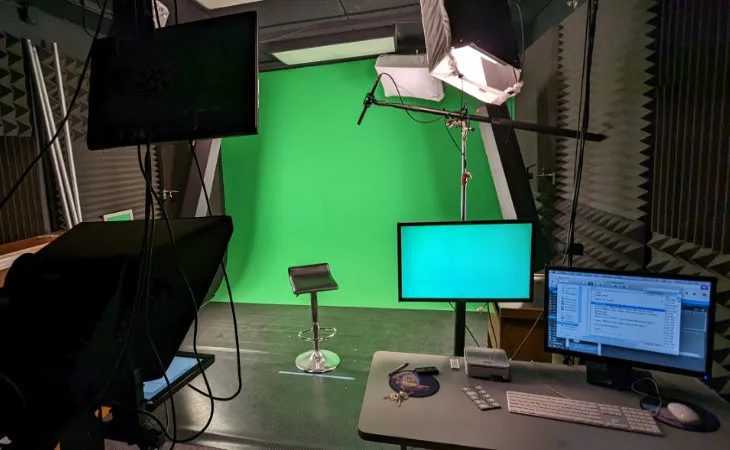
Green Room

Green Room (Jost Hall; 3rd Floor)

Professional Recording with Green Screen & Teleprompter

Features:

  • ✓ Green screen for custom backgrounds
  • ✓ Teleprompter system
  • ✓ 4K video camera
  • ✓ Professional lighting kit
  • ✓ HD audio recording

Booking Process:

1. Email script to Center for Online Learning 24 hours before
2. Book time slot via scheduler
3. Arrive 15 minutes early for setup
4. Files delivered within 48 hours

Schedule Green Room

Teaching Resources & Support

Tools, guides, and best practices for online and blended learning

📚

Teaching Modalities

Best practices for different course formats: asynchronous online, synchronous online, blended, in-person, and online with residency.

Explore Modalities →

Course Quality Checklist

Ensure your course meets recommended standards with a quality assurance checklist.

Download Checklist →

WCAG 2.1 Compliance

Guidelines and resources for making your course content accessible to all students.

View Compliance Guide →

About the Center for Online Learning

The Center for Online Learning supports faculty in creating engaging, effective online and blended learning experiences. Our team of instructional designers works collaboratively with faculty to enhance course design, integrate educational technology, and implement evidence-based teaching practices.

Our Services

  • Instructional Design Consultations: One-on-one support for course design, redesign, and improvement
  • Canvas LMS Support: Technical assistance with course setup, tools, and troubleshooting
  • Video Production: Access to recording studios and guidance on creating educational videos
  • Accessibility Support: Guidance on making course content accessible to all learners
  • Professional Development: Workshops, webinars, and resources on online teaching best practices

Our Team

We are a dedicated team committed to supporting your teaching success. We bring expertise in instructional design, educational technology, and online pedagogy to help you create the best possible learning experiences for your students.

Team Collaboration

Frequently Asked Questions

How do I request course assistance? +
Click the "Request Course Assistance" button at the top of the page or visit courseassist.fresno.edu. You can also email us directly at Center for Online Learning.
What's the difference between COL and IT support? +
The Center for Online Learning focuses on course design, Canvas LMS assistance, and teaching support. For SSO login issues, network access, or system authentication problems, please contact IT Helpdesk at help.fresno.edu.
How do I schedule an instructional design consultation? +
Click the "Schedule Instructional Design Consultation" button in the support section, or contact us directly at Center for Online Learning. Consultations are available for course design, technology integration, and teaching strategy discussions.
How do I access the recording studios? +
The Lightboard Room has self-access with a room code (contact us for the code). The Green Room requires advance booking via our scheduler and script submission 24 hours before your session. See the Recording Studios section above for full details.
How long does support take? +
We respond to support tickets within 24 hours during business days. Complex issues may require additional time, but we'll keep you updated throughout the process.
Where can I find WCAG compliance guidelines? +
Visit our WCAG 2.1 Compliance Guide for detailed information on making your course content accessible, including checklists, resources, and implementation strategies.

Ready to Enhance Your Online Teaching?

Get the support and resources you need to create engaging online learning experiences